



MY USED FURNITURE · WORKSPACE FIT
Standard desk height UK:
how high should your desk be?
A desk can fit the room and still be the wrong height for you. Start with the way you sit, stand and work.
Get your measurements
A height of 74cm (740mm) is a common starting point for a fixed office desk. Your own desk should let you work with relaxed shoulders, supported feet and a keyboard just below elbow height. For a sit-stand desk, check that its adjustment range covers both your seated and standing positions.
A desk can fit the room and still be the wrong height for the person using it. You might find yourself lifting your shoulders to type, sitting too far from the keyboard or raising your chair until your feet no longer reach the floor.
The answer is not always a new desk. Sometimes the chair needs adjusting, the monitor needs lifting or a cupboard is taking up the legroom. Other times, a fixed desk genuinely cannot give you the position you need.
This guide explains standard desk height, how to find a comfortable working height and what to measure before buying a fixed or height-adjustable desk for your home or workplace.
What is standard desk height in the UK?
74cm, or 740mm, is a common fixed office desk height. For example, Herman Miller lists its fixed-height Ratio desk at 740mm. Other desks have different dimensions, so check the actual product rather than treating that number as a universal specification. Herman Miller Ratio specifications.
For reference, 740mm is 74cm, or approximately 29.1 inches. A listing that says 160cm normally means the desk's width, not its height: look for separate width, depth and height measurements.
“Standard” describes a common furniture dimension. It does not tell you whether your chair, legs and keyboard will fit comfortably around it.
On a small screen, scroll the table sideways.
| Measurement | What it tells you | What it does not tell you |
|---|---|---|
| Desktop height | Distance from the floor to the upper surface | Whether your keyboard sits at a comfortable height |
| Clear height underneath | Space below the top, frame or other obstruction | Whether the entire leg area is clear |
| Adjustment range | Lowest and highest settings | Whether every user can find a suitable position |
| Worktop width and depth | Size of the working surface | How much space remains once equipment is in place |
That distinction matters when comparing used desks. Two tops can be the same size while their frames, cable trays and storage leave very different amounts of usable space.
How high should your desk be when sitting?
Start with the person, chair and keyboard together. The useful height is the one that lets you reach your equipment comfortably without lifting your shoulders or stretching forwards.
HSE's workstation guidance places the keyboard just below elbow height, with the screen in front of the user and the top of the screen around eye level. These are checks to make together, rather than separate numbers to copy. HSE guidance on good posture.
Setting up a height-adjustable desk
- Set the chair first. Sit back with your lower back supported. Adjust the seat so your feet are supported and the seat edge does not press uncomfortably behind your knees.
- Relax your shoulders and bring your hands into a typing position. Let your upper arms rest naturally beside you, with your forearms approximately horizontal.
- Bring the desk to your working position. Put the keyboard on it and adjust the surface until you can type without shrugging your shoulders or bending your wrists awkwardly.
- Check the mouse too. It should be close enough to use without reaching out to the side.
- Check underneath. Your thighs, knees and feet need room, and the chair needs to come close enough to the worktop.
The Furniture Industry Research Association's home-working guide uses this chair-first approach for an adjustable desk: establish a supported seated position, then bring the surface to the user. FIRA ergonomic home-working guide.
Setting up a fixed-height desk
A fixed desk gives you less room to change the surface, so the chair has to work with it. Adjust the chair to bring your arms into a comfortable working position. If that leaves your feet unsupported, a suitable footrest may help.
Do not stop at “my feet touch the floor”. A chair can be low enough for your feet while leaving the keyboard too high. Equally, raising the seat may improve your arm position but leave too little room between your thighs and the desk frame. HSE's DSE workstation checklist covers these relationships, including foot support and chair arms that prevent a close working position.
If you cannot get both a supported seat and a comfortable reach, the desk or chair may be the wrong fit. Repeatedly adjusting one to compensate for the other will not solve a physical limit.
How to measure your desk height properly
Check below it too.
Use a tape measure and take the measurements on the floor where the desk will be used.
Desktop height: measure vertically from the floor to the top of the working surface. Do not measure only to the metal frame or underside of the top.
Under-desk clearance: measure to the lowest obstruction where your legs need to go. That might be a support rail, drawer, cable tray or front edge rather than the desktop itself. Check the width and depth of that clear space too.
Chair clearance: measure the chair arms in the position you actually use. A chair that slides under the desk with its arms fully lowered may behave differently at your normal setting.
Adjustable range: record the lowest and highest finished desktop positions. A frame-only specification and a complete desk measurement can differ because of the worktop thickness.
Keep keyboard height in mind. Your hands work above the desktop, and a thick keyboard changes their position. A surface measurement is a useful starting point; the typing check tells you whether the setup works.
A measurement example
Suppose you find a comfortable seated desktop setting of 66cm and a standing setting of 108cm. These are illustrative measurements, not recommended heights for everyone.
A desk listed at 69–130cm covers the standing setting but does not reach the same seated setting. A desk listed at 65–125cm covers both numbers. That still leaves clearance, stability and equipment to check, but it gives you a much better shortlist than “electric desk” alone.
If the first desk otherwise suits you, a different chair position with appropriate foot support might work. Test the complete setup rather than assuming a higher maximum compensates for a minimum that is too high.
What is the correct standing desk height?
Set a standing desk around your working elbow position, with the keyboard allowing relaxed shoulders and approximately horizontal forearms. Find this position while standing in the shoes you normally wear at the desk.
Stand naturally, bring your hands into position and adjust the surface in small steps. Check that you can reach the keyboard and mouse without leaning on the desk or stretching forwards. Then check the screen separately.
The Chartered Institute of Ergonomics & Human Factors recommends this arm position in its sit-stand desk guidance. The same guidance recommends varying position rather than standing still for long periods.
If you use a standing mat, establish your setting while standing on it. Your position relative to the floor has changed, so a preset saved without it may need adjusting.
Can a desk-height calculator work it out for you?
A calculator based on your overall height can suggest a starting position. It cannot see your seated elbow height, chair, shoes, keyboard or working habits.
Two people of the same height can have different body proportions. ConSet, a height-adjustable desk manufacturer, explicitly describes its own height calculator as a starting point based partly on average proportions.
Use an estimate to narrow the search, then measure and adjust. A desk-height chart is less useful than knowing whether the actual desk reaches your own seated and standing positions.
What if you are shorter, taller or use a wheelchair?
For a shorter user, a desk's lower limit deserves particular attention; for a taller user, check both the standing maximum and the space underneath when sitting. Neither decision should rest on overall height alone.
If you use a wheelchair or specialist seating, take measurements in that actual setup. Consider the clear approach to the desk, armrests, space beneath the frame and whether the controls are within reach. An individual assessment is more useful than a generic height chart.
Why a sit-stand desk's minimum height matters
It is easy to focus on how high an electric desk goes. For seated work, its lowest setting can be just as important.
Manufacturer specifications show why the exact version matters. Herman Miller lists these different height options within its Ratio range:
On a small screen, scroll the table sideways.
| Ratio version | Published height or range |
|---|---|
| Fixed height | 740mm / 74cm |
| Electric single stage | 700–1200mm / 70–120cm |
| Electric dual stage | 650–1250mm / 65–125cm |
These are manufacturer examples, not a list of models currently stocked by My Used Furniture. The figures come from Herman Miller's Ratio specifications.
At My Used Furniture, our Bene LEVEL LIFT single desk listing gives a 69–130cm adjustment range and a 160 × 80cm worktop. The Bene LEVEL LIFT TWIN listing also gives a 69–130cm range, with two independently adjustable positions.
Those examples show why “height adjustable” is only the beginning of a comparison. Check the specific desk, its listed range and the space each person needs. Product specifications were checked for this guide on 3 November 2026; use the live listings for current details and availability.
Fixed, manually adjustable or electric: which type helps?
On a small screen, scroll the table sideways.
| Desk type | Where it can work well | The important check |
|---|---|---|
| Fixed-height desk | A dedicated setup where the desk and chair fit the user | Can you achieve a supported working position? |
| Manually height-adjustable desk | Setting a surface to a suitable height | Is it designed for seated adjustment only, or a full sit-stand range? |
| Electric sit-stand desk | Changing between seated and standing settings | Does its range cover both positions, with your equipment in place? |
| Desktop converter | Raising equipment on an existing desk | What height does its keyboard platform add when fully lowered? |
An adjustable desk is not automatically a sit-stand desk. Some adjust over a limited seated range. A converter can provide a standing option, but its lowest keyboard position may make a desk that was already too high even higher.
For a broader comparison of cost, setup and everyday use, read our sit-stand desks vs fixed-height desks guide.
Desk height, monitor height and legroom are different problems
A screen that is too low
If your hands are comfortable but you keep looking down at the screen, raising the whole desk also raises the keyboard. An appropriate monitor stand or arm lets you change the display position separately.
For prolonged laptop use, a separate keyboard and mouse allow the laptop screen to be raised without lifting your hands with it. That arrangement is included in HSE's laptop setup guidance.
With multiple screens, check where you spend most of your time looking. The main working area should not require a constant twist towards the side of the desk.
A desk that looks spacious but has poor legroom
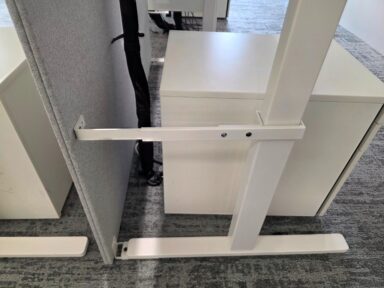
A generous worktop can hide a restrictive frame. Look underneath before deciding that a desk is large enough.
A deep drawer unit, low support bar or full cable tray can occupy the area your knees need. Pedestals can fit under the top while still leaving too little width for the chair and your legs.
This matters with sit-stand desks too. Measure storage against the lowest position you intend to use, not only the raised position in a product photograph. Plan a clear path for the moving top and frame, including any nearby windowsill, shelf or chair arm.
A shallow desk with a large screen
Height adjustment cannot create extra depth. Before buying, arrange your keyboard, mouse and screens within the proposed worktop dimensions. Check that the screen does not force you too close and that the mouse area remains usable.
Our used office desks buying guide covers desk size, shape and layout in more detail.
Common desk-height problems and what to check
On a small screen, scroll the table sideways.
| What you notice | Check first | A possible adjustment |
|---|---|---|
| Your shoulders lift when typing | Keyboard height relative to your elbows | Lower an adjustable surface, or review chair height and foot support |
| Your feet hang after raising the chair | Whether the fixed desk is forcing the seat too high | Consider a suitable footrest or a lower desk |
| The chair stays too far from the keyboard | Armrests, pedestal position and front frame | Adjust compatible armrests or remove the obstruction |
| Your knees touch underneath | The frame, tray or drawer below the top | Restore clearance or choose a different configuration |
| You lean down towards the display | Screen position rather than desktop height alone | Adjust the display independently |
| Standing feels awkward despite the saved height | Shoes, mat, reach and equipment position | Recheck the complete standing setup |
These are starting checks rather than a diagnosis. If discomfort continues, ask for a workstation assessment; persistent pain also needs appropriate professional advice.
What to check before buying a used height-adjustable desk
Buying second hand gives you another way to find a suitable desk within budget. The useful checks go beyond the brand name and worktop colour.
Range and measurements. Record the lowest and highest desktop settings, worktop dimensions and usable space underneath. Compare them with your own setup notes.
Exact model and configuration. Identify the desk version and whether it is a freestanding unit or part of a shared frame. On a two-person workstation, establish whether each position adjusts independently.
Operation. Where viewing or testing is available, check movement through the usable range and that the desk stays level. Look at its stability at standing height as well as at its lowest setting.
Supplied parts. Check what comes with the specific listing: handset, control box, power leads, fixings and any advertised storage. A monitor arm visible in a photograph may be separate; the listing should make that clear.
Equipment load. Compare the manufacturer's stated limit with the intended setup, following its instructions about what that limit includes. Screens, monitor arms and other equipment all need accounting for.
Cable movement. Plan enough slack for the highest setting and a route that will not snag or become trapped as the desk lowers. Check power, display and network leads, not only the desk's own supply.
Delivery and assembly. Find out whether it arrives assembled or dismantled, what installation involves and whether it will pass through your access route. Follow the model's instructions for assembly and operation; reset procedures vary.
Browse used sit-stand office desks to compare the actual ranges and configurations available. Use each listing for current condition, included parts and delivery details.
How often should you change between sitting and standing?
A saved standing height makes changing position easier. It does not mean you need to spend the rest of the day on your feet.
Build position changes into the work you do, and include opportunities to move away from the workstation. HSE recommends short, frequent breaks or changes of activity rather than relying on longer, less frequent breaks. It does not give one break schedule for every job. HSE guidance on work routine and breaks.
A reminder can be useful, but respond to how you feel and the task in front of you. Standing still for long stretches is not the purpose of a sit-stand desk.
For employers, providing adjustable furniture also does not replace a display screen equipment assessment. HSE says an assessment should consider the whole workstation, the work and the individual's requirements, and should be reviewed when relevant circumstances change. HSE guidance on workstations and assessment.
A desk measurement checklist to keep
Before comparing listings, write down:
- Comfortable seated desktop height: _____ cm, with your keyboard and chair in use.
- Comfortable standing desktop height: _____ cm, in your usual shoes and on any mat you use.
- Minimum clear space needed underneath: _____ cm high × _____ cm wide × _____ cm deep.
- Chair-arm height at your working setting: _____ cm.
- Required worktop width and depth: _____ cm × _____ cm, with equipment laid out.
- Storage and cable requirements: ____________________.
- Access or assembly restrictions: ____________________.
For shared desks, repeat the height checks for the people who will use them. Save personal presets if the model supports them, and make it easy for the next person to adjust the chair, surface and display.
Desk height FAQs
Is a 75cm desk too high?
Not automatically. A 75cm desk may suit your setup, but the number alone cannot establish that. Check keyboard reach, shoulder position, supported feet and clearance underneath with the chair at your working setting.
Is a 74cm desk suitable for everyone?
No. It is a common product height, not an individual measurement. Some people can use it comfortably with a suitable chair and foot support; others need a lower or higher surface.
Can I choose desk height from my height in feet and inches?
Use it as an initial estimate, then check your actual seated and standing positions. Overall height does not account for differences in body proportions, chair setup, keyboard thickness or footwear.
Can a standing desk be too high when sitting?
Yes. If its minimum setting is above your comfortable seated working height, it may not provide the setup you need without other changes. Check the lower limit as carefully as the upper limit.
Do I need an adjustable desk or a better chair?
Check what is limiting the setup. If the chair cannot give you a supported seat, start there. If the chair is suitable but the desk prevents comfortable reach or legroom, changing the surface height or desk configuration may be necessary. Our office chairs buying guide explains the chair adjustments to compare.
Does desk height include the worktop?
A finished desktop measurement runs from the floor to the upper surface, including the worktop. A frame specification may exclude it. Keep those two measurements separate when comparing listings or adding a different top.
Find a desk that fits the way you work
Measure your working position before narrowing the search by brand, finish or price. That way, you know which desks can do the job before choosing the one you like.
Explore used office desks and sit-stand office desks at My Used Furniture. Compare the measurements with your checklist and use the individual listing for current specifications and availability.
Prepared by My Used Furniture using the linked HSE, FIRA, CIEHF, ConSet and manufacturer guidance. Product examples were checked against our live listings on 3 November 2026. The example measurements are illustrative, and photographs do not establish an exact height. Check current listing details and availability before ordering.
More practical workplace advice →