

My Used Furniture
Frequently Asked Questions About Workstation Fit
Practical answers about chair adjustment and arranging your workspace. Furniture guidance is not a diagnosis or a promise to treat pain.
Choosing a chair
What chair is best for sitting long hours?
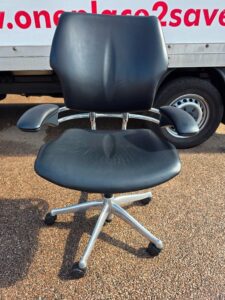
For long periods of desk work, start with an adjustable task chair that lets you use the desk comfortably and change position. Useful features include a suitable seat depth, back support and arms that do not force your shoulders upwards or stop you getting close to the desk.
What is the best ergonomic office chair to buy?
Start with a chair that addresses what your current one gets wrong. If the seat presses behind your knees, seat depth matters. If the arms stop you reaching the desk, their height and position matter. If the backrest never feels supportive, investigate the back shape and adjustments.
For a premium shortlist, a Steelcase Leap offers adjustable support and arms, while a Herman Miller Aeron provides a different mesh seating design with size choices. Our recommendation is to use those differences to guide a trial, not choose the chair with the longest feature list. A suitable used model is a valid option too.
Sources: Steelcase: Leap features and options · Herman Miller: Aeron Classic and Remastered
Who makes the comfiest office chairs?
Herman Miller, Steelcase and Knoll all make chairs worth trying if comfort is your priority, but their designs feel different. An Aeron's mesh seating is a different experience from a padded task chair, while Knoll's Generation uses a flexible back design.
Decide what comfort means for your working day. A soft first impression is not the same as support you still appreciate later. Give the seat edge, back shape and arm position attention, and find out whether you can change position easily. The most useful recommendation is a particular chair that suits you, not a promise about every chair from one maker.
Sources: Herman Miller: Aeron Classic and Remastered · Knoll: Generation design and specification
Size and adjustment
What is the highest seat height for an office chair?
A draughting chair or high task chair is the category to look at if an ordinary office chair does not rise far enough. My Used Furniture has a draughting chair collection, where the individual model's seat height and foot support should guide the choice.
Start with the work surface and the position your arms need to reach, not the tallest chair you can find. Your feet also need suitable support. Raising a standard chair beyond its intended range or fitting an unapproved cylinder is not a substitute for a chair designed for the task.
Is it good to have lumbar support for an office chair?
Yes, lumbar support can be useful when it meets your lower back comfortably and works with the rest of the chair. Adjustable support gives you more scope to position it where you need it.
What are the 3 examples of ergonomics?
Three everyday examples of ergonomics are setting your chair so you can work comfortably at the desk, positioning the screen so you do not keep craning your neck, and keeping the mouse close enough to avoid reaching for it repeatedly.
The common idea is making the work fit the person. It is not simply buying an expensive chair or sitting in one exact pose. A small change to the arrangement can matter more than another accessory if it removes an awkward movement you repeat throughout the day.
Sources: HSE: good posture when using DSE
Is there a weight limit for an office chair?
Yes. Office chairs have a maximum user load set for the particular model and configuration. That limit is not something to guess from the size of the base or how sturdy the chair feels.
If you need a higher capacity chair, look for one with a documented rating and suitable dimensions, rather than just choosing a wider seat. With a used chair, identify the model and inspect its condition as well. A published rating does not make a damaged chair suitable for continued use.
What are the different sitting postures?
Supported upright sitting and a supported recline can both be useful working positions when the chair and task allow them. You might sit more upright for detailed typing and lean back for reading, calls or thinking.
The aim is not to find one perfect pose and hold it all day. Arrange the equipment so that changing position does not leave you reaching for the keyboard or craning towards the screen. Standing can add variety where the desk is suitable, but movement and changes of activity remain important whichever furniture you use.
What is the best setup for working from home?
A good home working setup lets you use the screen, keyboard and mouse without repeatedly hunching, reaching or perching. Build it around the chair and working position first, then arrange the equipment and lighting.
Our chair buying guide is useful when choosing the seat and checking how it works with the desk. If you raise a laptop for prolonged work, use a separate keyboard and mouse. Give paperwork and chargers somewhere off the main working area, and avoid screen reflections. A dedicated room helps, but a carefully arranged corner can still be a useful workspace.
Sources: HSE: good posture when using DSE
Take the next step
For more detail, read our office chair buying guide. Browse the relevant furniture and check the condition, dimensions and current availability on each listing.